

How I create a digital lesson
When choosing a lesson to take digital, I consider three things about the skill I’m trying to impart:
1. This is a skill that students tend to gain in vastly different ways and at varying speeds.
2. I’ve acquired and created a plethora of my own instructional materials focused on this skill.
3. I believe I can provide my students with an authentic purpose for attaining this skill, making the lesson engaging and meaningful to them.
It’s so important to grab a student’s attention, and the introduction page is the first, best opportunity to do so. This page should outline the final performance task. For instance, the first digital lesson I created used a tiny house to help students solve problems involving area and perimeter. My introduction requires each student to take on the role of architect and create a floor plan that meets the needs of their pretend clients.
When converting a lesson to digital, consider the existing assets you have, particularly the ones that have already been effective in engaging students. At the same time, imagine what other video and audio assets might be available. Chances are, if it’s a great idea, it’s already out there.
With area and perimeter, I combined the best of my earlier attempts with a few of the go-to videos and Google Slides I often show at the onset of the unit. Having them rooted in the lesson this way allows my students to access them at any time.
A digital lesson should include opportunities for practice. I created a page of self-checking multiple-choice questions from the many area and perimeter questions I’ve already created. After students complete their practice, the lesson should make it simple to transition back to the performance task. A first step might require them to demonstrate their understanding, which also serves as a great formative assessment tool for the teacher.
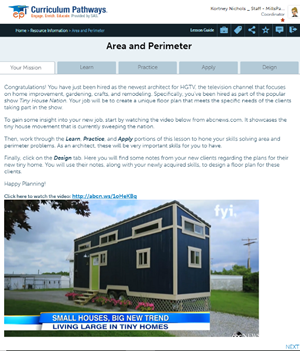
I instructed students to conduct research to find and analyze a tiny house floor plan. They must calculate and record the area and perimeter of various sections of the house. I provide links to the research websites right in the lesson.
Ideally, a digital lesson platform will automatically save students’ work to their online portfolio. This whole portion of the lesson is paperless, and students can always go back to previous pages for support.
The digital way
Video and web content can spark creativity in ways analog materials never could. In my lesson, students take on the role of architect and create their own tiny floor plans. The new technology in products like Crio enables me to embed a handful of videos and links, each showcasing different designs. Lastly, sharing capabilities are critical to an effective digital lesson. In my case, students can submit the entire lesson to our Google Classroom. On top of that, I can share the whole lesson with any other teacher who is part of the Crio Community.
Taking my perimeter and area lesson was a great learning experience and inspired me to modernize multiple lessons. Whether it’s with Crio or another program, I hope my journey is a helpful guide for others who want to take a favorite lesson, or a particularly challenging skill, from paper to digital.
If I’m lucky, by the end of the year I’ll have created enough digital lessons to replace some of my old filing cabinets with a few more bean bag chairs or even a learning center for my students to use instead!
- So, you want to be a school administrator? - October 28, 2026
- The data retention challenge for online exam platforms - October 27, 2026
- The bottleneck in every classroom: Working memory, cognitive load, and the conditions for learning - October 26, 2026