
These engineering tools can help with classroom instruction
 Here are reviews of six high-quality apps, tools, and websites that can help teach engineering concepts, courtesy of Common Sense Media and its new Graphite service—a free database of teacher-written reviews of learning technologies.
Amazing Alex
Learning rating: 4 (out of 5)
Grade range: 4-8
What is it? A crazy contraptions physics app that has kids cobble together Rube Goldberg-like devices to guide balls.
Pros: Inspiring and challenging activities are easy to navigate with the clean, sophisticated design.
Cons: Scientific terminology is lacking, as is a gentle hint system to teach concepts.
Bottom line: With endless possibilities and refined controls, Amazing Alex inspires kids to make unique puzzles and imaginative machines.
Full review: http://www.graphite.org/app/amazing-alex
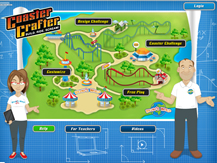
Coaster Crafter
Learning rating: 4
Grade range: 7-12
What is it? This website cleverly draws on students’ love of roller coasters to teach velocity, force, and motion.
Pros: Students get frequent feedback, and after they master the basics they can try to build their own roller coasters.
Cons: Doesn’t work on tablet browsers, and teachers can’t assess student progress.
Bottom line: Outstanding physics game has ample teacher support and connects to a pastime that’s just plain fun.
Full review: http://www.graphite.org/website/coaster-crafter
Design Squad Nation
Learning rating: 5
Grade range: 3-8
What is it? Classmates can compete to solve fun engineering problems with this website.
Pros: Highly interactive resources drive home the skills and processes of engineering and design.
Cons: Episodes and games use Adobe Flash and won’t work on iOS devices.
Bottom line: Design Squad Nation makes engineering fun through hands-on activities and easy-to-understand scientific explanations.
Full review: http://www.graphite.org/website/design-squad-nation
Minecraft
Learning rating: 5
Grade range: 3-12
What is it? A spiraling sandbox of adventure and creation gets kids to dig deep in this game for Windows, Mac, and Linux devices.
Pros: Delivers open, creative, and purposeful play supported by frequent updates.
Cons: Open world can lead to power struggles and community problems without a shared code of conduct.
Bottom line: An irresistible and seemingly limitless incubator for 21st-century skills that, with a little guidance, can chart new courses for learning.
Full review: http://www.graphite.org/game/minecraft
MinecraftEdu
Learning rating: 5
Grade range: 1-12
What is it? A teacher dashboard and genius tutorial help this sandbox gem sparkle.
Pros: Stellar tutorial map and teacher dashboard aid accessibility and customizability.
Cons: Runs the danger of schoolifying Minecraft.
Bottom line: Great for learners who are new to Minecraft and in need of guidance, but loses some of the wide-open and mysterious allure of the original.
Full review: http://www.graphite.org/game/minecraftedu
World of Goo
Learning rating: 4
Grade range: 4-12
What is it? A fun puzzler about building structures with unique materials.
Pros: Intuitive controls, great design, and lots of implicit learning make this game a winner to explore.
Cons: Some of the challenging puzzles might frustrate kids with spatial difficulties.
Bottom line: A dependable hook for getting kids interested in geometry and the elements of building structures.
Full review: http://www.graphite.org/game/world-of-goo

- Outlier by Savvas Named to TIME World’s Top EdTech Companies 2024 List - May 24, 2024
- Texas Instruments and Vernier Science Education to Help Deepen Students’ STEM Understanding through Real-Time Data Collection - May 23, 2024
- Discovery Museum Recognized as a 2024 Recipient of the Nation’s Highest Museum and Library Honor - May 22, 2024
Comments are closed.