

Installation
First, you need to install the add-on if you have not done so already.
- From Google Sheets, click “Add-ons” then “Get add-ons.” You can do this right from your form-populated spreadsheet.
- Scroll down to find “Save as Doc” or search for “Save as Doc.”
- Click the “+ FREE” button to install the add-on.
Using Saveasdoc with form spreadsheet responses.
- Start by selecting the rows and columns of data you wish to turn into a Google Doc. You can select all if you wish to collect everything.
- To select data, hold down your mouse button, and drag to highlight the desired data in your Google Sheet.

- Now click “Add-ons” then “Save as Doc” and “Start.” This will open a panel on the right side of the Sheet.

- For “Save Doc file” type in a name for the new document that will hold the data.
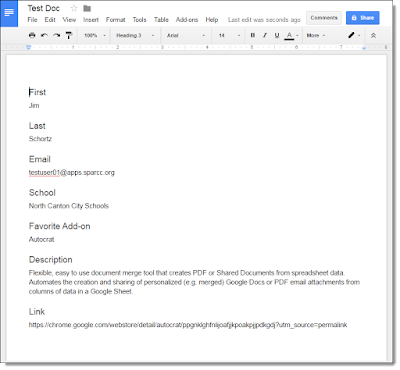
- Check “Include Headings” if you would like the column headings to appear above each item in the Doc. This is useful to remember which question each answer goes with.
- You can also select the size for the headings in the Doc from “Heading 1” (large) to “Heading 5” (small).
- Check the box for “Add a page break after each row” to start a new page in the Google Doc for each set of form responses. This will separate all the responses from each person on a different page of the Doc.
- Finally, click the “Save as Doc” button.
- When done, you can click the “Open the Doc” link to view your new document.
- You will have all of the responses to your Google Form in an easy to read Google Doc.
Final thoughts
Certainly, there are other options for reformatting the responses in a Google Form. For example, you could use the “autoCrat” add-on for Sheets to merge the responses into separate Google Docs. Although I love autoCrat and use it extensively, it is more complicated, and more powerful, than what you may need.
So if you need a quick and easy way to make your Form responses easier to read, the “Save as Doc” add-on is a perfect match.
Latest posts by eSchool Media Contributors (see all)
- Beyond the game: What schools must get right about student well-being in esports - November 10, 2026
- Moving beyond plaudits: The anatomy of effective recognition - November 9, 2026
- 5 signs a student is struggling in the post-literate era - November 6, 2026